

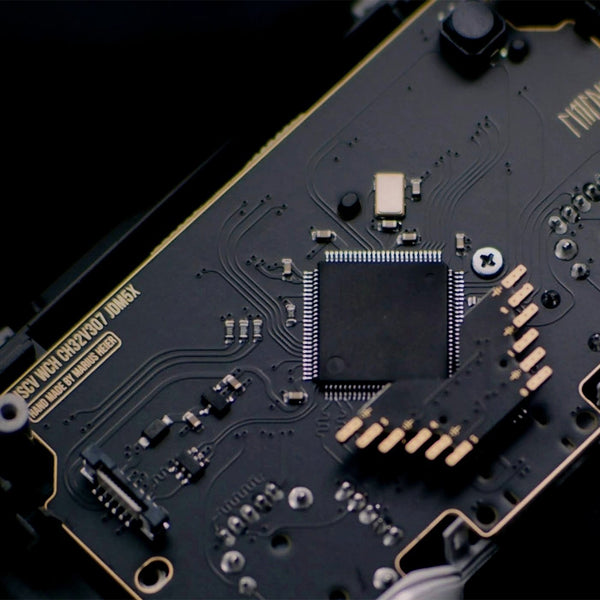
A boutique collab between Battle Beaver Customs and hardware innovator Marius Heier, bringing competitive players a stripped-down, performance-first controller board.
Made solely for PC use, the Marius JDM-5X & BDM-5X boards are custom PCBs designed for the DualShock 4 & DualSense controllers, respectively, to deliver the fastest connection and input experience possible.
At Battle Beaver, we understand performance. With Marius Heier’s engineering and our controller expertise, these boards push competitive play to a new level for players who expect more.
DISCLAIMERS
By purchasing this product you are opting into Marius' experimental ecosystem, where technical understanding and controller knowledge will greatly enhance the user experience of these devices.
We are strictly providing our services as an authorized distributor and installer of the hardware, with our own additional modifications being optional to the experience.
For troubleshooting and support, see the FAQ that will be updated as time goes on.
How to Get One
- Purchase a New Controller
To get a Marius board, you’ll need to build a new controller using the JDM-5X or BDM-5X Marius Controller Builder.
- Send-In Service
Send in your own PS4 controller with your Marius Board, or purchase one from us for professional installation by our team. PS5 BDM-5X Upgrade available late 2026. To start the send-in process, click the button below.
- DIY Kits
Purchase Marius Boards with a pre-wired rear shell that you can install into your own controller.
** PS5 Marius DIY Kits are not available at this time **
All Sales Are Final
All sales regarding the installation of these products are FINAL due to the irreversible modifications that are made during installation.
**Setup Information for the Marius Board**
Recalibration is recommended when your controller arrives to suit your needs and playstyle, Battle Beaver will only send out controllers with generalized calibration settings.
Calibration settings should be checked any time the controller is moved and used with a different computer.

Ready to design your own?
Troubleshooting
My LED is flashing green and I can't set up the controller
My LED is flashing green and I can't set up the controller
Update the controller's firmware by visiting https://update.mariusheier.com and
following the on-screen instructions.
When I press my analog R2, I feel it hitting something
When I press my analog R2, I feel it hitting something
This is likely caused by the trigger arm hitting the USB-C ribbon cable.
Unscrew the four rearshell screws and partially open the controller. Gently push
the USB-C ribbon cable to guide it towards the middle of the controller, then close the controller back up and check again.
I can't close my controller and it feels like something is blocking it
I can't close my controller and it feels like something is blocking it
If the controller has rear buttons:
See Step 3. Without these cuts, the midplate will likely collide with the rear button installation, preventing the controller from closing.
If the controller does NOT have rear buttons:
Re-open the controller and make sure everything is actually fully seated, paying close attention to the board and midplate. If that isn't the source of the issue, contact Battle Beaver Customer Support.
Support
Frequently Asked Questions
Why order the JDM-5X from Battle Beaver instead of Marius?
Why order the JDM-5X from Battle Beaver instead of Marius?
The benefit of purchasing a JDM-5X board from Battle Beaver means receiving a ready-to-play controller.
We remove all of the required equipment and technical soldering experience to make use of the parts you'd get from Marius, and offer our own patented and signature modifications that professional and casual players enjoy to build a uniquely competitive PC-Only controller.
Setup Configuration & Update Links
Setup Configuration & Update Links
To setup, recalibrate, remap, and more:
https://setup.mariusheier.com/
For update notifications please use Marius' Official Channels:
Firmware Updates: https://update.mariusheier.com/
How does it connect?
How does it connect?
The board requires a wired connection to a Rear I/O port with a USB-C to A cable. Connections to a case USB port or a USB hub are incompatible.
What can this board NOT do?
What can this board NOT do?
As this is a custom board, it is important to note that controllers built with this WILL NOT HAVE the following:
- Console connectivity
- Bluetooth connection
- Macros / Keybinding
- Rumble / Vibration
- Touchpad Tracking
- Battery
What are MIDAS Mechs (HE)?
What are MIDAS Mechs (HE)?
MIDAS Mechs (HE) are the custom 5 pin Hall Effect thumbstick for the PS4 JDM-5X by Marius Heier.
MIDAS stands for Magnetic Integrated Digital Array Sensors, and are only compatible with the PS4 JDM-5X board. Unfortunately the 5 pin connectors are not compatible with 1st Party boards from Sony or Microsoft.
These unique Hall Effect thumbsticks overcome the issue you see in traditional 3 pin HE sticks other 3rd party controllers have by utilizing a fully circular magnet sensor for wider signal coverage, and an additional 2 pins of signal transference for improved accuracy and stability.
Why isn't Battle Beaver using the same Ginful Thumbstick mechanisms as Marius?
Why isn't Battle Beaver using the same Ginful Thumbstick mechanisms as Marius?
All of our modifications were built and developed on the ALPS platform, but after testing the Ginful stick boxes we believe that they have a significant enough difference in the return-to-center feeling that we decided to stick with what we know.
What is a JDM-5X board? What are the best use cases for a controller with a JDM-5X board?
What is a JDM-5X board? What are the best use cases for a controller with a JDM-5X board?
The JDM-5X board is a custom PC only controller board developed by Marius Heier, matching the form factor of a PlayStation 4 board. It's one of the fastest boards available on the market: GPDL testing shows a button latency of 1.43ms at 8KHz, which is faster than an overclocked 8KHz DualSense controller (2.11ms) and is roughly twice as fast as a max-overclocked PlayStation 4 controller (2.89ms).
Click here for Average Latency Comparison by Controller.
The JDM-5X also reaches that 8KHz polling rate without having to install separate overclock drivers like hidusbf. With this board in your hands, you'll never have to doubt whether or not your controller is keeping up with you.
What are the differences between the MIDAS HE 5-pin thumbstick mechs and the two 3-pin options (Magneto TMR and Alps OEM)? Which one is better?
What are the differences between the MIDAS HE 5-pin thumbstick mechs and the two 3-pin options (Magneto TMR and Alps OEM)? Which one is better?
Alps OEM thumbstick mechs are the standard mechs used on PlayStation controllers. They'll act and feel just like a stock controller, because they're stock parts. However, due to how carbon-track potentiometers work, they will almost always develop stick drift over time.
This is an unavoidable limitation of the physical hardware. If you're okay with that risk, nothing will perform or feel more like the controllers you're used to than OEM thumbstick mechs.
If you want to avoid thumbstick drift for as long as possible, though, MIDAS HE 5-pin and Magneto TMR 3-pin both fulfill that role.
They both have upgraded sensors that use magnets to generate thumbstick input values instead of a carbon track that wears down over time. Both offer superior performance compared to OEM, and both are highly drift-resistant.
Where they differ is in the technology:
MIDAS HE 5-pin
MIDAS Mechs use an array of Hall Effect magnetic sensors combined with two extra pins for signal validation, so they're capturing more reliable data from more areas of the magnetic field as the thumbsticks move. Hall Effect technology is older than TMR, but the sensor array setup is fundamentally different than most Hall Effect mechs, which usually only use a single sensor.
Magneto TMR 3-pin
Magneto Mechs use TMR (Tunnel Magnetoresistance) sensors, the highest-precision magnetic single-sensor technology available in a controller. They lack the extra validation pins and sensor array of the MIDAS mechs, but precision is still high and drift is still rare. Common feedback is that they feel closer to OEM handling.
So are MIDAS mechs or Magneto mechs the better magnetic sensor option?
This will fundamentally come down to personal taste. Both magnetic sensors are extremely accurate and highly drift-resistant. TMR is generally better technology than Hall Effect, but the MIDAS Mechs have the extra sensors and pins for a cleaner and more complete signal. Magneto Mechs, on the other hand, can feel closer to an OEM controller, and they perform at a similar level for a lower cost.
Either choice is excellent.
Will the controller come ready to plug and play?
Will the controller come ready to plug and play?
Yes, your controller is ready to go out of the box, set up and calibrated in-house by our technicians before shipping.
Note: We calibrate every controller to match our optimal settings, but those settings may not match your preferences. Customize at https://setup.mariusheier.com.
How does Battle Beaver configure the controllers?
How does Battle Beaver configure the controllers?
Stick Configuration
Inner Deadzone: 2%
Outer Deadzone: 5%
Raising the Outer Deadzone helps push the Circularity Error Rate to a range closer to OEM, reducing the likelihood of sluggish diagonals. We also fine-tune the thumbstick values in Advanced mode to make sure each cardinal direction (up, down, left, right) easily reaches a maximum value. Exact fine-tune numbers vary.
Trigger Configuration
Mode: Analog for all trigger types. (See "Should I choose Analog or Digital for
triggers?" for more explanation.)
Rest: When triggers are at rest, we make sure the Raw value under the trigger meter is slightly higher than the Rest value. Exact numbers vary.
Press: This value controls how early or late the triggers reach their maximum value. Exact numbers vary.
Hair Trigger: 100% - This slider doesn't behave as expected, so we set it to 100% to effectively disable it.
LED Control
Color: #0099FF for Battle Beaver blue.
External Input Mapping
Button assignments vary depending on customer selection. Our most common layout is Left - X (cross), Right - O (circle).
Polling Rate
Slider: 8KHz.
My board should be running at 8KHz, but it isn't. What can I do?
My board should be running at 8KHz, but it isn't. What can I do?
First, check these common factors:
- The setup configuration: make sure the polling rate slider didn't reset itself to a
lower value, then re-save the calibration and check again. - Your cable specs: USB-A to USB-C, USB 3.0+ for best performance.
- The USB port you're using: connect to the motherboard directly, not through a USB hub or to a front panel USB header.
If those aren't the issue, join Marius's Discord server at https://discord.com/invite/QcCkfbkp3S and ask for help there. Include as much detail as you can.
Note: to check the polling rate of your JDM-5X board more reliably, use the DEEPPOLL tool found at https://tools.mariusheier.com.
I’m suddenly having performance issues, stuttering, jittery aim, etc. on my PC. What’s wrong?
I’m suddenly having performance issues, stuttering, jittery aim, etc. on my PC. What’s wrong?
8KHz polling rate may be too much for your system (or the game you’re playing) to handle. Older CPUs, some motherboards, or certain USB ports can get overloaded by the higher polling rate.
If you don’t want to drop to a lower polling rate, try the easy options first: different cable, different USB port, different game. After that, use Marius’s CPU Direct tool to make sure you’re connected to a CPU-direct USB port.
If the issue continues, drop the polling rate to 4KHz and check again. If that isn’t it, drop to 2KHz and check again. And if that isn’t it, the most effective next step is contacting Marius via his Discord for deeper hardware troubleshooting: https://discord.com/invite/QcCkfbkp3S.
Note: Battle Beaver is unable to assist with individual motherboard-level connection issues or JDM-5X hardware issues beyond the basics.
What’s the point if I can’t have it at 8KHz?
What’s the point if I can’t have it at 8KHz?
We’re currently building an XLAT latency measuring tool from Finalmouse to provide our own robust testing numbers. However, early community testing has shown that even all the way down at 1KHz, the JDM-5X can perform faster than 8KHz OC’d DualSense/DSE controllers.
As Marius himself puts it, asking the pizza guy, “Is it done yet?” more often is less important than making sure the pizza is cooked faster.
Can I have the hidusbf software running? Can I use that software on a JDM-5X controller?
Can I have the hidusbf software running? Can I use that software on a JDM-5X controller?
Yes, the software can be running without causing an issue. However, using it to try to
overclock one of these boards will cause performance to degrade. Instead, make sure no overclocks are applied to the JDM-5X board or the USB port it's plugged into, then use Marius's Setup page to apply the 8KHz polling rate.
Do I need to use DS4-Windows or a similar program to use this controller on PC?
Do I need to use DS4-Windows or a similar program to use this controller on PC?
No. These boards share the PlayStation 4 form factor, but they are not a PS4 board
replacement. The JDM-5X has no console compatibility and is PC-only. Because of
this, it's plug and play on PC — no extra software required.
Should I choose Analog or Digital for triggers?
Should I choose Analog or Digital for triggers?
For all Battle Beaver JDM-5X controllers: calibrate the triggers as Analog, regardless of whether you ordered stock or Smart Triggers. During initial setup, do not click the SKIP THIS STEP button.
Smart Triggers initial setup: follow the on-screen instructions as closely as you’re able to. Since there’s no way to actually slow press a Smart Trigger, however, getting the counter to go down during that step will require some experimentation with the timing.
If you did accidentally select SKIP THIS STEP during initial setup, don't worry:
repeating the Setup or Calibration process will allow you to fix it.
In the Trigger Configuration section in the Settings Menu, make sure the triggers are set to Analog.
The reason: Selecting Digital tells the controller to look for triggers on the Eagle Board. We wire Smart Bumpers and Triggers to a separate chip.
Note: this information may change with a future board revision or software update, and it may not match if you purchased your controller from a different company.
Last updated: February 27, 2026.
Can I swap from a 3-pin to a 5-pin thumbstick mech, or vice versa? How much would it cost?
Can I swap from a 3-pin to a 5-pin thumbstick mech, or vice versa? How much would it cost?
3-pin and 5-pin thumbstick mechs and boards are not cross-compatible. The boards themselves are different where the mechs connect.
Swapping from 3-pin to 5-pin requires purchasing a new board of the correct variant. To purchase one from Battle Beaver, you have three options:
- Build your own: https://battlebeavercustoms.com/pages/ps4-marius-builder
- Send your existing controller in for an upgrade: https://
battlebeavercustoms.com/pages/ps4-send-in-upgrade - Purchase a DIY Kit to upgrade at home: https://battlebeavercustoms.com/
collections/marius-board-kits
Costs vary depending on which option you choose. Base cost is $150 for a 5-pin board, and $120 for a 3-pin board, not including installation or other modification costs.
(Pricing info is current as of February 27, 2026, and is subject to change.)
What TMR sensor does Battle Beaver use in Magneto Mechs?
What TMR sensor does Battle Beaver use in Magneto Mechs?
AKNES V5/V6 TMR sensors, retrofit onto an OEM Alps frame for a drift-resistant upgrade that keeps the familiar OEM feeling under your thumbs.
Note: this information will change over time if/when AKNES releases new versions and
we receive new stock.
Last updated: February 27, 2026.
How can I verify my polling rate?
How can I verify my polling rate?
Use the DEEPPOLL tool located at https://tools.mariusheier.com.
Note: this tool does not measure input latency itself, only polling rate.
For DEEPPOLL support, join Marius's Discord server at https://discord.com/invite/QcCkfbkp3S.